vectagaming
Xbox Game Bar widgets for Windows

Precision for every shot. Vecta Crosshair and VectaZoom: a crosshair overlay and a zoom lens for Xbox Game Bar.

Vecta Crosshair puts a pixel-sharp aim point on your screen. VectaZoom pins a magnifying lens over your game. Both live in Xbox Game Bar, work offline and never ask for an account.

The widgets

Two tools. One steady sight.

Each does one job inside Xbox Game Bar and stays out of the way of everything else. Pin it once, close the app, and play.

Vecta Crosshair app icon
Vecta Crosshair
Crosshair overlay · v3.3
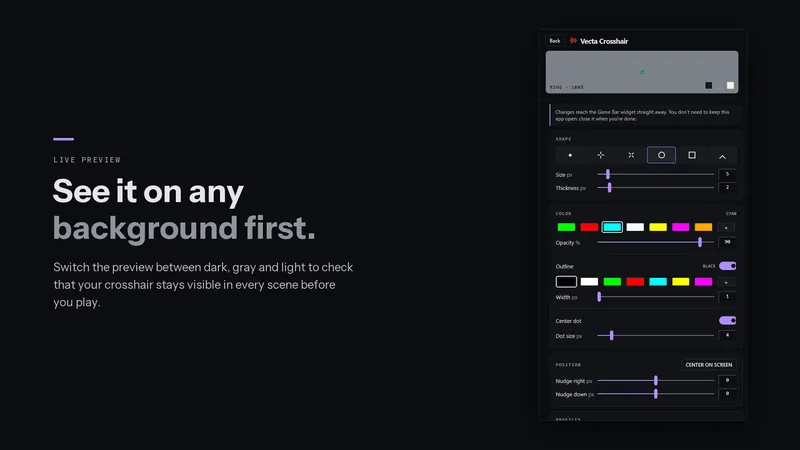
Your crosshair, drawn to the pixel.

A clean, steady aim point over any game. Pick a shape and color, check it in the live preview, center it in one click and keep it pinned while you play.

  • Six shapes: dot, plus, cross, ring, square and chevron
  • Any color, opacity, outline and center dot
  • Per-game profiles, hotkeys and share codes
USD 1.99 · Windows 10 & 11
VectaZoom app icon
VectaZoom
Zoom lens · v1.1

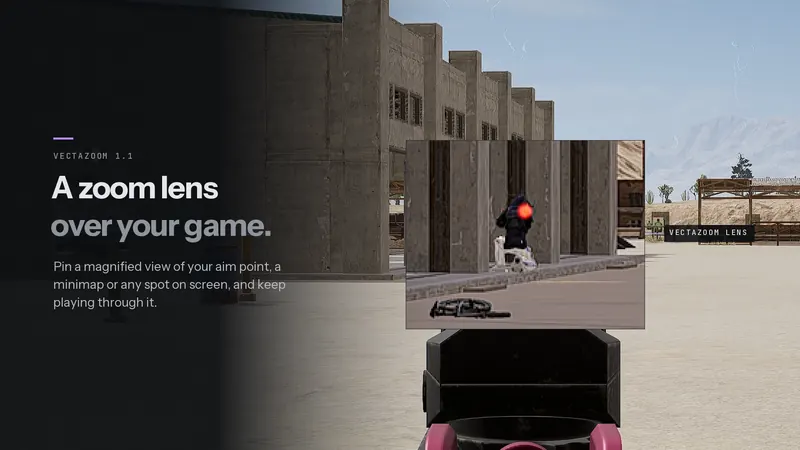
A zoom lens, pinned over your game.

Magnify the middle of the picture, a minimap, or wherever your pointer is. It captures the game's own window, so the lens can sit right over what it magnifies.

  • 1× to 16×, with one-click 2× to 8×
  • Square, rounded or circle lens, dot or cross reticle
  • Hold-to-zoom keys and settings for each game
USD 4.99 · Windows 11

Setup

On screen in a minute. No app left running.

Both widgets run inside Xbox Game Bar, the overlay built into Windows. Here is the whole setup; pick a step to see it.

WIDGET MENU Win + G WIDGETS Vecta Crosshair VectaZoom CROSSHAIR ZOOM Click-through GAME BAR CLOSED · PINNED
  1. Press Win + GXbox Game Bar opens over your game.
  2. Open the Widget MenuChoose Vecta Crosshair or VectaZoom. It appears on screen.
  3. Pin the widgetClick its pin so it stays after Game Bar closes.
  4. Turn on click-throughYour clicks then go to the game instead of the widget. This is the step people miss.
  5. Close Game Bar and playPress Win + G again. The widget stays, and the app window doesn't need to stay open.
Built like an instrument

Quiet tools for loud games.

Offline and private

No account, no ads, no internet connection. Settings stay on your PC; nothing is collected, recorded or sent.

Part of Windows

Both run as Xbox Game Bar widgets, drawn on top of the screen. They don't hook into games or touch game files.

Set for every game

Save a setup for each game and it loads by itself when that game starts. Hotkeys handle the rest mid-match.

Runs in
Xbox Game Bar
Windows
10 & 11 · Zoom: 11
Account
None
Data collected
None
Pricing
One-time purchase
Questions

Before you pin one.

What is an Xbox Game Bar widget?

Xbox Game Bar is the overlay built into Windows 10 and 11 that opens with Win + G. Widgets are small apps that live inside it. You can pin a widget so it stays on screen over your game after Game Bar closes, which is how Vecta Crosshair and VectaZoom work.

Do they work in full-screen games?

They work best with games in borderless or windowed full-screen mode. Exclusive full-screen can hide Game Bar overlays, so switch the game's display mode to borderless if a widget doesn't show.

Can an overlay get me banned?

Both widgets only draw on top of the screen through Xbox Game Bar, a part of Windows. They don't read or change a game's files or memory. Some competitive games and tournaments restrict any on-screen aids, so check the rules of the game and event you play.

Which versions of Windows are supported?

Vecta Crosshair runs on Windows 10 version 1809 or later and on Windows 11. VectaZoom needs Windows 11, because it uses the Windows 11 screen-capture features to see your game.

Do I need to keep the app open?

No. The widget runs inside Game Bar. Once it's pinned you can close the app window; changes you make in the app still reach the widget.

Do the apps collect any data?

No. Neither app has an account, ads or analytics, and neither asks for internet access. Settings and profiles stay on your PC, and VectaZoom never saves what it captures.

How do I get help?

Start with the Vecta Crosshair help or the VectaZoom help. If that doesn't solve it, email support@innerpulse.net with your Windows version and what happened.

Get them on the Microsoft Store

Pin it. Play.

A one-time purchase each, installed and updated by the Microsoft Store.